Wednesday, 10 June 2015

XMLEncoder/Decoder


Java_bloge image_01

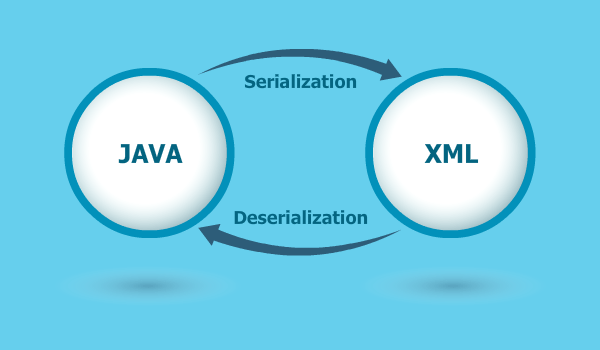
Java Object Serialization feature was introduced in JDK 1.1. Serialization transforms a Java object or graph of Java object into an array of bytes which can be stored in a file or transmitted over network.
At a later time we can transform those bytes back into Java objects. All this is done using java.io.ObjectOutputStream and java.io.ObjectInputStream classes. ObjectOutputStream class provides methods to write primitive data types and graphs of Java objects to an OutputStream. The objects can be read (reconstituted) using an ObjectInputStream.
However, there are problems related to this approach of Serialization of Java objects. Some of them are listed below:
  • Logic that saves and restores serialized objects is based on the internal structure of the constituent classes. Any changes to those classes between the time the object was saved and when it was retrieved may cause the deserialization process to fail.
  • Versioning problems can occur. If you save an object using one version of the class, but attempt to deserialize it using a newer, different version of the class, deserialization might fail.
Rather than serializing Java objects to binary format we can serialize them to XML documents which is human readable.


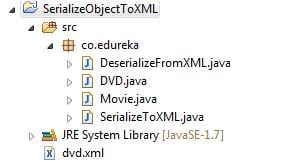
Project Structure :
projectsturcture


XMLEncoder
java.beans.XMLEncoder works by cloning the object graph and recording the steps that were necessary to create the clone. This way XMLEncoder has a “working copy” of the object graph that mimics the steps XMLDecoder would take to decode the file. Let’s see how to serialize a Java object using XMLEncoder.
Given below is the DVD class which has a List<Movie> as a member.
public class DVD { 
 private List movies=new ArrayList(); 
 public DVD(){}
 public List getMovies() {
  return movies;
 }
 public void setMovies(List movies) {
  this.movies = movies;
 } 
 public String toString(){
  String movies="";
  for(Movie movie:getMovies()){
   movies += movie.getName()+", ";
  }
  return movies; 
 } 
}

Movie class has name, runtime, directors, released year and cast as members.
public class Movie { 
 private String name;
 private int runtime;
 private String directors;
 private int released; 
 private String cast; 
 public Movie(){} 

 public Movie(String name, int runtime, String directors,int released, String cast) {  
  this.name = name;
  this.runtime = runtime;
  this.directors = directors;
  this.released = released;
  this.cast = cast;
 }
 public String getName() {
  return name;
 }
 public void setName(String name) {
  this.name = name;
 }
 public int getRuntime() {
  return runtime;
 }
 public void setRuntime(int runtime) {
  this.runtime = runtime;
 }
 public String getDirectors() {
  return directors;
 }
 public void setDirectors(String directors) {
  this.directors = directors;
 }
 public int getReleased() {
  return released;
 }
 public void setReleased(int released) {
  this.released = released;
 }
 public String getCast() {
  return cast;
 }
 public void setCast(String cast) {
  this.cast = cast;
 }

}
 
We want to save DVD object which constitutes List<Movie>. Serializing a DVD object would require serialization of Movie objects also.
Serializing Object to XML 
SerializeToXML class has main method which creates four Movie objects. Put them into a List and then set that list as value for DVD instance. Once we have the object to be serialized we create an XMLEncoder instance, then we write that object and call the close method on the encoder instance.

public class SerializeToXML { 

 private static final String SERIALIZED_FILE_NAME="dvd.xml";

 public static void main(String args[]){

  Movie bourneIndentity=new Movie("The Bourne Identity",119,"Doug Liman",2002,"Matt Damon, Franka Potente");
  Movie bourneSupermacy=new Movie("The Bourne Supremacy",108,"Paul Greengrass",2004,"Matt Damon, Franka Potente, Joan Allen");
  Movie bourneUltimatum=new Movie("The Bourne Ultimatum",115,"Paul Greengrass",2007,"Matt Damon, Edgar Ramirez, Joan Allen");
  Movie bourneLegacy=new Movie("The Bourne Legacy",135,"Tony Gilroy",2012,"Jeremy Renner, Rachel Weisz, Edward Norton");

  List moviesList=new ArrayList();
  moviesList.add(bourneIndentity);
  moviesList.add(bourneSupermacy);
  moviesList.add(bourneUltimatum);
  moviesList.add(bourneLegacy);

  DVD bourneSeries=new DVD();
  bourneSeries.setMovies(moviesList);

  XMLEncoder encoder=null;
  try{
  encoder=new XMLEncoder(new BufferedOutputStream(new FileOutputStream(SERIALIZED_FILE_NAME)));
  }catch(FileNotFoundException fileNotFound){
   System.out.println("ERROR: While Creating or Opening the File dvd.xml");
  }
  encoder.writeObject(bourneSeries);
  encoder.close();

 }

}
 
On executing the SerializeToXML class it will serialize the java object to dvd.xml file (In Eclipse IDE you might have to refresh the project to see the newly created dvd.xml file)

< ?xml version="1.0" encoding="UTF-8"?>
< java version="1.7.0_75" class="java.beans.XMLDecoder">
 < object class="co.edureka.DVD" id="DVD0">
  < void property="movies">
   < void method="add">
    < object class="co.edureka.Movie">
     < void property="cast">
      < string>Matt Damon, Franka Potente< /string>
     < /void>
     < void property="directors">
      < string>Doug Liman< /string>
     < /void>
     < void property="name">
      < string>The Bourne Identity< /string>
     < /void>
     < void property="released">
      < int>2002< /int>
     < /void>
     < void property="runtime">
      < int>119< /int>
     < /void>
    < /object>
   < /void>
   < void method="add">
    < object class="co.edureka.Movie">
     < void property="cast">
      < string>Matt Damon, Franka Potente, Joan Allen< /string>
     < /void>
     < void property="directors">
      < string>Paul Greengrass< /string>
     < /void>
     < void property="name">
      < string>The Bourne Supremacy< /string>
     < /void>
     < void property="released">
      < int>2004< /int>
     < /void>
     < void property="runtime">
      < int>108< /int>
     < /void>
    < /object>
   < /void>
   < void method="add">
    < object class="co.edureka.Movie">
     < void property="cast">
      < string>Matt Damon, Edgar Ramirez, Joan Allen< /string>
     < /void>
     < void property="directors">
      < string>Paul Greengrass< /string>
     < /void>
     < void property="name">
      < string>The Bourne Ultimatum< /string>
     < /void>
     < void property="released">
      < int>2007< /int>
     < /void>
     < void property="runtime">
      < int>115< /int>
     < /void>
    < /object>
   < /void>
   < void method="add">
    < object class="co.edureka.Movie">
     < void property="cast">
      < string>Jeremy Renner, Rachel Weisz, Edward Norton< /string>
     < /void>
     < void property="directors">
      < string>Tony Gilroy< /string>
     < /void>
     < void property="name">
      < string>The Bourne Legacy< /string>
     < /void>
     < void property="released">
      < int>2012< /int>
     < /void>
     < void property="runtime">
      < int>135< /int>
     < /void>
    < /object>
   < /void>
  < /void>
 < /object>
< /java>
 
Deserializing Object from XML
To get the DVD object back from XML file we will use java.beans.Decoder class.
We create an XMLDecoder instance and call the readObject method. An explicit cast is required as readObject() returns an Object type
public class DeserializeFromXML { 
 private static final String SERIALIZED_FILE_NAME="dvd.xml";

 public static void main(String[] args) {
  XMLDecoder decoder=null;
  try {
   decoder=new XMLDecoder(new BufferedInputStream(new FileInputStream(SERIALIZED_FILE_NAME)));
  } catch (FileNotFoundException e) {
   System.out.println("ERROR: File dvd.xml not found");
  }
  DVD bourneSeries=(DVD)decoder.readObject();
  System.out.println(bourneSeries);

 }
}
 
Output
deserial
We serialized a Java object to an XML document and then deserialized it to get the actual Java object.

Note :  We have no-arg constructors in both DVD and Movie class . You will get java.lang.InstantiationException in case no-arg constructor is not present in each class involved in the object graph of the object to be serialized.

Java_bloge image_01

Wednesday, 29 April 2015

Java Annotations


 History and Overview of Java Annotations

In java, Annotations were introduced as “A Metadata Facility” through JSR 175. The JSR description states it’s purpose as :
“A metadata facility for the Java-TM Programming Language would allow classes, interfaces, fields, and methods to be marked as having particular attributes”.
We are talking about meta data multiple times. What is this metadata in java language context? Why we even care about them? Let’s understand the need to metadata with an example.
Below is a sourcecode of class which is declared as final:


public final class MyFinalClass{
    //other class members
}
 
 
Now we have ‘final’ keyword in class declaration. And the impact of this declaration is that you can’t extend this class or make a child class of it. How compiler understand this? Simply because of ‘final‘ keyword. Right? Well, this is called metadata.

 A metadata is data about data. Metadata adds some additional flags on your actual data (i.e. in above case the class MyFinalClass), and in runtime either you or JVM who understand these flags, can utilize this metadata information to make appropriate decisions based on context.
In java, we use the annotations to denote metadata. We can annotate classes, interface, methods, parameters and even packages also. We have to utilize the metadata information represented by these annotations in runtime usually.

Built-in Annotations in Java

Obliviously you can define your own but java does provide some in-built annotations too for ready-made use. In this section, we will learn about these in-build annotations and their detailed usages.
Before moving ahead, it’s important to remind that annotations are metadata and they can be applied to any part of sourcecode and even on other annotations as well. I will start by discussing annotations which should be applied on other annotations because it will make more sense when we start discussing annotations applicable on java sourcecode.

Annotations Applied To Other Annotations

Generally below discussed five annotations are used inside other annotations to hint compiler that how new annotation should be treated by JVM. Let’s explore these 5 annotations one by one.


 @Retention

This annotation specifies how the marked annotation is stored in java runtime. Whether it is limited to source code only, embedded into the generated class file, or it will be available at runtime through reflection as well.

  
import java.lang.annotation.Retention;
import java.lang.annotation.RetentionPolicy;

//@Retention(RetentionPolicy.CLASS)
@Retention(RetentionPolicy.RUNTIME)
//@Retention(RetentionPolicy.SOURCE)
public @interface MyCustomAnnotation
{
    //some code
}

@Documented

This annotation indicates that new annotation should be included into java documents generated by java document generator tools.

  
import java.lang.annotation.Documented;

@Documented
public @interface MyCustomAnnotation {
   //Some other code
}

@Target

Use @Target annotation to restrict the usage of new annotation on certain java elements such as class, interface or methods. After specifying the targets, you will be able to use the new annotation on given elements only.

  
import java.lang.annotation.ElementType;
import java.lang.annotation.Target;

@Target(value = {ElementType.TYPE, ElementType.METHOD, ElementType.CONSTRUCTOR,
                 ElementType.ANNOTATION_TYPE, ElementType.FIELD, ElementType.LOCAL_VARIABLE,
                 ElementType.PACKAGE, ElementType.PARAMETER})
public @interface MyCustomAnnotation {
   //Some other code
}

@Inherited

When you apply this annotation to any other annotation i.e. @MyCustomAnnotation; and @MyCustomAnnotation is applied of any class MyParentClass then @MyCustomAnnotation will be available to all child classes of MyParentClass as well. It essentially means that when you try to lookup the annotation @MyCustomAnnotation on any class X, then all the parent classes of X unto n level are queried for @MyCustomAnnotation; and if annotation is present at any level then result is true, else false.

Please note that by default annotations applied on parent class are not available to child classes.

  
import java.lang.annotation.Inherited;

@Inherited
public @interface MyCustomAnnotation {
   //Some other code
}

@Repeatable

By default, an annotation is applied on a java element only once. But, by any requirement, you have to apply a annotation more than once, then use @Repeatable annotation on your new annotation.

@Repeatable has been added in latest java 8 release.

  
@Repeatable(Schedules.class)
public @interface Schedule { ... }

Now use above annotation as below:

  
@Schedule(dayOfMonth="last")
@Schedule(dayOfWeek="Fri", hour="23")
public void doPeriodicCleanup() { ... }

Annotations Applied To Java Code

So far we learned about annotation which were meant to be applied on other annotations. Now we will look at other in-built annotations which are primarily targeted towards java sourcecode elements.

@Override

This annotation checks that the annotated method is overridden method. It causes a compile time “error” if the annotated method is not found in one of the parent classes or implemented interfaces. Very useful annotation and I will recommend to use it frequently.

  
public class DemoClass
{
   //some code
  
   @Override
   public String toString()
   {
      return super.toString();
   }
  
   @Override
   public int hashCode()
   {
      return super.hashCode();
   }
}

@Deprecated

Use this annotation on methods or classes which you need to mark as deprecated. Any class that will try to use this deprecated class or method, will get a compiler “warning“.

  
@Deprecated
public Integer myMethod()
{
    return null;
}

@SuppressWarnings

This annotation instructs the compiler to suppress the compile time warnings specified in the annotation parameters. e.g. to ignore the warnings of unused class attributes and methods use @SuppressWarnings("unused") either for a given attribute or at class level for all the unused attributes and unused methods.

  
@SuppressWarnings("unused")
public class DemoClass
{
     //@SuppressWarnings("unused")
     private String str = null;  
    
   //@SuppressWarnings("unused")
     private String getString(){
        return this.str;
     }
}

To see the list of all supported options to @SuppressWarnings, please refer to specific IDE reference documentation. e.g. for Eclipse refer to this complete list of values.

@SafeVarargs

Introduced in java 7, this annotation ensures that the body of the annotated method or constructor does not perform potentially unsafe operations on its varargs parameter. Applying this annotation to a method or constructor suppresses unchecked warnings about a non-reifiable variable arity (vararg) type and suppresses unchecked warnings about parameterized array creation at call sites.

  
public static <T> List<T> list( final T... items )
{
    return Arrays.asList( items );
}

@FunctionalInterface

This annotation is used to mark an interface as functional interface which are introduced in java 8. To read more about functional interfaces please follow the linked post.

  
@FunctionalInterface
public interface MyFirstFunctionalInterface {
    public void doSomeWork();
}

Custom Annotations in Java

All of the above annotation given examples above are in-built java annotations and you can utilize them into your sourcecode directly. Java allows you to create your own metadata in form of custom annotations. You can create your own annotations for specific purposes and use them as well. Let’s learn how to do create custom annotations.

Creating Custom Annotations

To create a custom annotation, you must use the keyword “@interface“. Other important things to remember while creating custom annotations are listed below:

    Each method declaration defines an element of the annotation type.
    Method declarations must not have any parameters or a throws clause.
    Return types are restricted to primitives, String, Class, enums, annotations, and arrays of the preceding types.
    Methods can have default values.

Some example custom annotaion definitions and their usage can be listed as:

Example 1

  
// Declares the annotation DemoAnnotation without any value
public @interface DemoAnnotation {
}

//Use the annotation like below

@DemoAnnotation
public void toggle() {
}

Example 2

  
public @interface Author {
    String first();
    String last();
}

//Use the annotation like below

@Author(first = "saral", last = "Gupta")
Book book = new Book();

Example 3

  
public @interface TravelRequest {
    int    id();
    String synopsis();
    String engineer() default "[unassigned]";
    String date()    default "[unimplemented]";
}

//Use the annotation like below

@TravelRequest(
    id       = 112233,
    synopsis = "Teleport me",
    engineer = "Mr. John Carter",
    date     = "04/01/3007"
)
public static void sendMeToMars () {
}

Using Custom Annotations

You must have got a brief idea of how annotations should be used in above examples. Still, I am providing a more detailed example which we can later use in next section where we will read the annotation values through reflection.

Based on rules above listed, I have created one annotation @JavaFileInfo, which has two attributes i.e. author and version. This can be applied on java class, interface, enum OR any method only. Default values are provided to if it’s not there then also we print something.


package test.core.annotations;

import java.lang.annotation.ElementType;
import java.lang.annotation.Retention;
import java.lang.annotation.RetentionPolicy;
import java.lang.annotation.Target;

@Target({ElementType.TYPE, ElementType.METHOD})
@Retention(RetentionPolicy.RUNTIME)
public @interface JavaFileInfo
{
   String author() default "unknown";
   String version() default "0.0";
}

Now to use above annotation, all we have to do is to annotate any class/interface of method and provide the author name, and version of file if any.

  
package test.core.annotations;

@JavaFileInfo
public class DemoClass
{
   @JavaFileInfo(author = "saral", version = "1.0")
   public String getString()
   {
      return null;
   }
}

That’s all. It’s so easy to use annotations, right?

Processing Annotations Using Reflection

Till now, we have only created the annotation and then used it. The main reason we are using annotations are because they are metadata. So it means we should be able to fetch this metadata to utilize the annotation information when we need it.

In java, you have to use reflection API to access annotations on any type (i.e. class or interface) or methods. Let’s learn how to do this with an example.

  
package test.core.annotations;

import java.lang.annotation.Annotation;
import java.lang.reflect.AnnotatedElement;
import java.lang.reflect.Method;

public class ProcessAnnotationExample
{
   public static void main(String[] args) throws NoSuchMethodException, SecurityException
   {
      new DemoClass();
      Class<DemoClass> demoClassObj = DemoClass.class;
      readAnnotationOn(demoClassObj);
      Method method = demoClassObj.getMethod("getString", new Class[]{});
      readAnnotationOn(method);
   }

   static void readAnnotationOn(AnnotatedElement element)
   {
      try
      {
         System.out.println("\n Finding annotations on " + element.getClass().getName());
         Annotation[] annotations = element.getAnnotations();
         for (Annotation annotation : annotations)
         {
            if (annotation instanceof JavaFileInfo)
            {
               JavaFileInfo fileInfo = (JavaFileInfo) annotation;
               System.out.println("Author :" + fileInfo.author());
               System.out.println("Version :" + fileInfo.version());
            }
         }
      } catch (Exception e)
      {
         e.printStackTrace();
      }
   }
}

Output:


Finding annotations on java.lang.Class
Author :unknown
Version :0.0

Finding annotations on java.lang.reflect.Method
Author :saral
Version :1.0

Summary

Before the advent of Annotations, you don’t need to define your sourcecode metadata outside in some properties file. Now, they can directly define this meta-data information in the source code itself. If used this feature wisely (as it is used in latest java frameworks like Spring and Struts), benefits are countless.

Let’s summarize our learning from this post in some bullet points:

    Annotations are metadata which can be applied on either annotations OR other java element in java sourcecode.

    Annotations do not directly affect program semantics, but they do affect the way programs are treated by tools and libraries, which can in turn affect the semantics of the running progra

    Annotations can be read from source files, class files, or reflectively at run time.
    There are 10 in-built annotations as of today. 5 of them are meant to be applied on custom annotations and other 5 are meant to be applied on java source code elements. Read respective sections for more details.

    Because annotation types are compiled and stored in byte code files just like classes, the annotations returned by these methods can be queried just like any regular Java object. You saw an example above.


Sunday, 1 February 2015

Hibernate Object Life Cycle

In hibernate object life cycle, mainly consists of four states. They are 
  1. Transient State, 
  2. Persistent State, 
  3. Detached State and 
  4. Removed State.
Hibernate Object Life Cycle

1. New or Transient State:
When ever an object of a POJO class is Created(instantiated) using the new operator then it will be in the Transient state; this object is not associated with any Hibernate Session.
For example,
Employee employee = new Employee("Ranga", 27, 30998); // Transient
When we call delete() on persistent object then it also moves to transient state.
session.delete(employee); 
This object don’t have any association with any database table row. In other words any modification in data of transient state object doesn't have any impact on the database table. so their state is lost as soon as they’re no longer referenced by any other object.
Note: Transient objects exist in heap memory.
Transient state will be happened two scenarios:
  1. First where the objects are created by application but not connected to a session, and 
  2. Second the objects are created by a closed session.
Converting Transient State to Persistence State:
  • By saving the that object
    • session.save()
    • session.persist()
    • session.saveOrUpdate()
  • By loading that object from database
    • session.load()
    • session.get(),
    • session.byId()
    • session.byNaturalId() etc..
2. Persistent or Managed State:
In order to convert or move an object from Transient to Persistent, there are two ways.
  1. Saving the object to the database using session
  2. Loading the object from the database using session
In this state object known to the hibernate and represent a one row in the database. Hibernate will detect any changes made to an object in persistent state and synchronize the state with the database when the unit of work completes.
Different ways to Save an Object:
Hibernate supports the different ways to save an object to the database. They are
  • session.save()
  • session.saveOrUpdate()
  • session.persist()
For example,
Employee employee = new Employee("Ranga", 27, 30998); // Transient
session.save(employee); // persitent

Different Ways to Load an Object:
Hibernate supports the different ways to load an object from the database. Few of them are
  • session.get()
  • session.load()
  • session.byId()
  • session.byNaturalId() etc...
For example,
Employee employee = session.get(Employee.class, 1); // here employee object is associated   with session. So employee object state is Persistent.
Persistent State
We can covert the object from persistent state to detached state by clearing the cache of the session or close the session using evict(), clear() and close() methods.

Converting Persistent State to Detached State:
  • session.evict();
  • session.clear();
  • session.close();
3. Detached State:
In order to convert or move an object from Persistence to Detached State, we need to clear the cache of the session or close the session by using following methods.
  • session.evict();  - clear particular object from the cache
  • session.clear();  - clears all objects from the cache
  • session.close(); 
Employee employee = new Employee("Ranga", 27, 30998); // Transient
session.save(employee); // persitent
session.close(); // here employee state is detached because currently it is not associated  with session.
Detached State
Changes made in this object does not reflect to the database. But we can change the state to persistent by calling following methods on detached object.
  • session.update()
  • session.merge()
  • session.saveOrUpdate()
Converting Detached State to Persistent State:
  • session.update()
  • session.merge()
  • session.saveOrUpdate()
4. Removed State:
This is last state in the hibernate object life cycle. A persistent object is considered to be in the removed state when a delete() operation is called on it. Note that Once you've deleted an object and moved to the “removed” state, you should no longer use that particular object for any reason.
For example:
session.delete(employee);
Removed State
Example:
package com.varasofttech.client;

import org.hibernate.Session;
import org.hibernate.SessionFactory;
import org.hibernate.Transaction;

import com.varasofttech.pojo.Employee;
import com.varasofttech.util.HibernateUtil;

public class Application {
    public static void main(String[] args) {
        
        SessionFactory sessionFactory = HibernateUtil.getSessionFactory();
        Session session = sessionFactory.openSession();
        
        // Hibernate Object Life Cycle
        
        // New or Transient State begin
        Employee employee = new Employee("Ranga", 27, 30998);       
        // New or Transient State end
        
        System.out.println("Session Info in Transient State : ");
        System.out.println(session);
        
        // Persistent or Managed State begin
        Transaction transaction = session.beginTransaction();
        session.save(employee);
        transaction.commit();
        // Persistent or Managed State end
        
        System.out.println("Session Info in Persistent State : ");
        System.out.println(session);
        
        // Detached State begin
        session.evict(employee);
        // Detached State end
        
        System.out.println("Session Info in Detached State : ");
        System.out.println(session);
        
        // Persistent State begin
        transaction = session.beginTransaction();
        employee.setName("Ranga Reddy");
        employee.setAge(27);
        
        session.saveOrUpdate(employee);
        transaction.commit();
        // Persistent State end
        
        System.out.println("Session Info in Persistent State : ");
        System.out.println(session);
        
        // Removed State begin      
        session.delete(employee);
        // Removed State end    
        
        System.out.println("Session Info in Removed State : "); 
        System.out.println(session);
        
        sessionFactory.close();
    }
    
}

Output:

Session Info in Transient State : 
SessionImpl(PersistenceContext[entityKeys=[],collectionKeys=[]];ActionQueue[insertions=org.hibernate.engine.spi.ExecutableList@59505b48 updates=org.hibernate.engine.spi.ExecutableList@4efac082 deletions=org.hibernate.engine.spi.ExecutableList@6bd61f98 orphanRemovals=org.hibernate.engine.spi.ExecutableList@48aca48b collectionCreations=org.hibernate.engine.spi.ExecutableList@13fd2ccd collectionRemovals=org.hibernate.engine.spi.ExecutableList@b9b00e0 collectionUpdates=org.hibernate.engine.spi.ExecutableList@506ae4d4 collectionQueuedOps=org.hibernate.engine.spi.ExecutableList@7d4f9aae unresolvedInsertDependencies=UnresolvedEntityInsertActions[]])

Hibernate: select max(e_id) from employees
Hibernate: insert into employees (e_name, e_age, e_salary, e_id) values (?, ?, ?, ?)

Session Info in Persistent State : 
SessionImpl(PersistenceContext[entityKeys=[EntityKey[com.varasofttech.pojo.Employee#9]],collectionKeys=[]];ActionQueue[insertions=org.hibernate.engine.spi.ExecutableList@59505b48 updates=org.hibernate.engine.spi.ExecutableList@4efac082 deletions=org.hibernate.engine.spi.ExecutableList@6bd61f98 orphanRemovals=org.hibernate.engine.spi.ExecutableList@48aca48b collectionCreations=org.hibernate.engine.spi.ExecutableList@13fd2ccd collectionRemovals=org.hibernate.engine.spi.ExecutableList@b9b00e0 collectionUpdates=org.hibernate.engine.spi.ExecutableList@506ae4d4 collectionQueuedOps=org.hibernate.engine.spi.ExecutableList@7d4f9aae unresolvedInsertDependencies=UnresolvedEntityInsertActions[]])

Session Info in Detached State : 
SessionImpl(PersistenceContext[entityKeys=[],collectionKeys=[]];ActionQueue[insertions=org.hibernate.engine.spi.ExecutableList@59505b48 updates=org.hibernate.engine.spi.ExecutableList@4efac082 deletions=org.hibernate.engine.spi.ExecutableList@6bd61f98 orphanRemovals=org.hibernate.engine.spi.ExecutableList@48aca48b collectionCreations=org.hibernate.engine.spi.ExecutableList@13fd2ccd collectionRemovals=org.hibernate.engine.spi.ExecutableList@b9b00e0 collectionUpdates=org.hibernate.engine.spi.ExecutableList@506ae4d4 collectionQueuedOps=org.hibernate.engine.spi.ExecutableList@7d4f9aae unresolvedInsertDependencies=UnresolvedEntityInsertActions[]])

Hibernate: update employees set e_name=?, e_age=?, e_salary=? where e_id=?

Session Info in Persistent State : 
SessionImpl(PersistenceContext[entityKeys=[EntityKey[com.varasofttech.pojo.Employee#9]],collectionKeys=[]];ActionQueue[insertions=org.hibernate.engine.spi.ExecutableList@59505b48 updates=org.hibernate.engine.spi.ExecutableList@4efac082 deletions=org.hibernate.engine.spi.ExecutableList@6bd61f98 orphanRemovals=org.hibernate.engine.spi.ExecutableList@48aca48b collectionCreations=org.hibernate.engine.spi.ExecutableList@13fd2ccd collectionRemovals=org.hibernate.engine.spi.ExecutableList@b9b00e0 collectionUpdates=org.hibernate.engine.spi.ExecutableList@506ae4d4 collectionQueuedOps=org.hibernate.engine.spi.ExecutableList@7d4f9aae unresolvedInsertDependencies=UnresolvedEntityInsertActions[]])

Session Info in Removed State : 
SessionImpl(PersistenceContext[entityKeys=[EntityKey[com.varasofttech.pojo.Employee#9]],collectionKeys=[]];ActionQueue[insertions=org.hibernate.engine.spi.ExecutableList@59505b48 updates=org.hibernate.engine.spi.ExecutableList@4efac082 deletions=org.hibernate.engine.spi.ExecutableList@6bd61f98 orphanRemovals=org.hibernate.engine.spi.ExecutableList@48aca48b collectionCreations=org.hibernate.engine.spi.ExecutableList@13fd2ccd collectionRemovals=org.hibernate.engine.spi.ExecutableList@b9b00e0 collectionUpdates=org.hibernate.engine.spi.ExecutableList@506ae4d4 collectionQueuedOps=org.hibernate.engine.spi.ExecutableList@7d4f9aae unresolvedInsertDependencies=UnresolvedEntityInsertActions[]])

Tuesday, 27 January 2015


Parallel Processing ...

Processors are not going to get much faster. No higher clockspeeds are foreseen. The speed of processing will be further increasing through parallellization, engaging multiple CPU cores for handling all tasks rather than a single faster core.

 This is but one reason for taking a closer look at the threading model in Java and the way we can do asynchronous and parallel processing as of Java 5. Another reason for my interest in asynchronous processing has to do with (perceived) performance. If an application performs a task on behalf of a user, it may block until the task is completed. The user cannot do anything until the task completes – watching the hourglass or whatever busy cursor is used. With asynchronous processing, a task which the user does not immediately require the results from can be processed in a separate thread. The perception of the user therefore is that the task is performed (or at least processed) much faster than in the synchronous case. And even though it is only perception – perception is usually all that counts!

 Furthermore, if the task can be broken in smaller pieces that can be executed in parallel, we really can speed up the task – provided processing power is available. Many tasks involve IO-processing, database access or web service calls – all operations that do not burden the CPU very much and leave room for parallel activities in other threads.

 In this article I will tell about my first explorations of the world of Futures, ExecutorServices, CompletionService, Callback interfaces and ThreadPools.


We will look at some very simple classes – to isolate the essence.

Let’s start with the class SlowWorker. It is like an employee who can do work for us. It has a method doWork() that performs some crucial, long-running task. Well, in this case the task is sleeping for 2 seconds. But you get the idea.


package future;

public class SlowWorker {

    public SlowWorker() {
    }

    public void doWork() {
        try {
            System.out.println("==== working, working, working ====== ");
            Thread.sleep(2000);
            System.out.println("==== ready! ======");
        } catch (InterruptedException e) {
        }
    }

    public static void main(String[] args) {
        SlowWorker worker = new SlowWorker();
        System.out.println("Start Work"  + new java.util.Date());
        worker.doWork();
        System.out.println("... try to do something while the work is being done....");

        System.out.println("End work" + new java.util.Date());
        System.exit(0);
    }

}
In the main method, a SlowWorker instance is created and the doWork() is invoked. Then the main method tries to perform some other important task – printing to the system output – while (!) the doWork() churns away on its task. However, since this is a synchronous call, this attempt at parallel activity fails. The output of running this class is:


Start WorkWed Feb 18 07:06:41 CET 2009
==== working, working, working ======
==== ready! ======
... try to do something while the work is being done....
End workWed Feb 18 07:06:43 CET 2009
This tells us – no surprise – that first doWork() completed and only then the “try to do something while…” is processed and sent to the output.


First stab at asynchronous, parallel execution

In Java 5, organizing work in parallel executing tasks has become much easier. The low level thread manipulation of Java 1.4 and before is no longer required or desired. An ExecutorService – almost like a central business unit in an organization where we can submit tasks assignments – takes our task (a Callable object) and has it executed. The ExecutorService returns a Future, an object that has a reference to the task we handed over to the ExecutorService. We can use that ‘claim slip’ to later learn about the progress of our task. Just like we would ask our business unit, using some task identifier they returned to us when we submitted the task, whether the task is complete.

And just like the central business unit would have one or more staff members that can work on a task assignment when the previous one was finished – the ExecutorService has a ThreadPool with one or multiple threads. When a thread is idle, it can take on a Callable object that was submitted to the ExecutorService. When the thread completes the task, it will notify the ExecutorService that in turn updates the Future object.

Anyone with a reference to the Future object can inspect the task’s progress using for example the isDone() method on the Future. With a call to get() on the Future, we can get the result of the executing the task. Note however that this call will block until the result is available! It is like asking the business unit for the progress of the task and being forced to wait until the task is complete and an answer is given. As soon as future.get() is called, the parallellism vanishes as the calling thread is blocked until the task executed on the parallel thread completes.

A code example of this:


package future;

import java.util.concurrent.Callable;
import java.util.concurrent.ExecutionException;
import java.util.concurrent.ExecutorService;
import java.util.concurrent.Executors;
import java.util.concurrent.Future;

public class AsynchronousWorker {
    public AsynchronousWorker() {
    }

    public static void main(String[] args) {
        System.out.println("Start Work"  + new java.util.Date());
        ExecutorService es = Executors.newFixedThreadPool(3);
        final Future future = es.submit(new Callable() {
                    public Object call() throws Exception {
                        new SlowWorker().doWork();
                        return null;
                    }
                });

        System.out.println("... try to do something while the work is being done....");
        System.out.println("... and more ....");
        try {
            future.get(); // blocking call - the main thread blocks until task is done
        } catch (InterruptedException e) {
        } catch (ExecutionException e) {
        }
        System.out.println("End work" + new java.util.Date());
        System.exit(0);
    }
}
We instantiate an ExecutorService with a thread pool consisting of three threads. We submit a Callable object to this service – that does nothing more than calling a SlowWorker object to perform doWork(). The ExecutorService hands us the claim slip – the Future object. We can then continue processing – “try to do something while…” – and leave it to the ExecutorService to find an available thread to handle the Callable object.

When we run this AsynchronousWorker, the output is like this:


Start WorkWed Feb 18 07:28:09 CET 2009
... try to do something while the work is being done....
... and more ....
==== working, working, working ====== (Worker Id = 1)
==== ready! ======
End workWed Feb 18 07:28:12 CET 2009
This tells us that after we started the main thread did the “something while” (after sending the Callable task to the ExecutorService) and “… and more …”. At that point we see the first sign of life from the SlowWorker – an indication that the ExecutorService has found a thread that is now busy processing our task. At some point the SlowWorker is done (ready!) and the main thread ends as well. Note that the call future.get() has the main thread blocked until the SlowWorker is done.

Executing multiple tasks – true parallel activity

Having one task processed asynchronously is only mildly useful – especially if you do not really have much useful to do yourself. If you hand your task to the central business unit – say Office Management – for ‘parallel processing’ then go take a cup of coffee yourself while you wait for the task to be done does not seem overly useful.

We will now look at the situation where multiple tasks have to be performed. Engaging multiple parallel threads for handling those tasks should speed up the over all process.

First the sequential situation:

package future;

import java.util.Date;

public class SequentialWorker {
    public SequentialWorker() {
    }
    private static int numberOfJobs = 5;

    public static void main(String[] args) {
        Date startTime = new java.util.Date();
        System.out.println("Start Work"  + startTime);
        for(int i=0;i <numberOfJobs;i++) {
          System.out.println("* Start worker "+i);
          SlowWorker worker = new SlowWorker(i);
          worker.doWork();
        }
        System.out.println("... try to do something while the work is being done....");

        Date endTime = new java.util.Date();
        System.out.println("End work at " + endTime);
        System.out.println("Job took " + new Double(0.001*(endTime.getTime() - startTime.getTime()))+ " seconds");
        System.exit(0);
    }
}
Here we have the normal situation: five jobs are performed – five calls to SlowWorker’s doWork() method. And since we do not engage parallel processing, we get sequential processing. Since a job takes 2 seconds, the entire program will run for at least 10 seconds:


Start WorkWed Feb 18 07:51:07 CET 2009
* Start worker 0
==== working, working, working ====== (Worker Id = 0)
==== ready! ======
* Start worker 1
==== working, working, working ====== (Worker Id = 1)
==== ready! ======
* Start worker 2
==== working, working, working ====== (Worker Id = 2)
==== ready! ======
* Start worker 3
==== working, working, working ====== (Worker Id = 3)
==== ready! ======
* Start worker 4
==== working, working, working ====== (Worker Id = 4)
==== ready! ======
... try to do something while the work is being done....
End work at Wed Feb 18 07:51:17 CET 2009
Job took 10.046 seconds
We see that the overall job takes 10 seconds and a bit and the ‘do something while’ is done only after all jobs have been processed. Very sequentially all of this.

Now we will parallellize that same workload, using the ExecutorService:


package future;

... imports
public class SequentialAsynchronousWorker {
    public SequentialAsynchronousWorker() {
    }
    private static int numberOfJobs = 5;

    public static void main(String[] args) {
        Date startTime = new java.util.Date();
        System.out.println("Start Work"  + startTime);
        ExecutorService es = Executors.newFixedThreadPool(3);
        List<Future> futures = new ArrayList<Future>();
        for(int i=0;i<numberOfJobs;i++) {
          System.out.println("* Start worker "+i);
          futures.add(es.submit(new Callable() {
                        public Object call() throws Exception {
                            new SlowWorker().doWork();
                            return null;
                        }
                    }));
        }

        System.out.println("... try to do something while the work is being done....");
        System.out.println("... and more ....");
        int ctr=0;
        for (Future future:futures)
        try {
            future.get();  // blocking call, explicitly waiting for the response from a specific task, not necessarily the first task that is completed
            System.out.println("** response worker "+ ++ctr +" is in");
        } catch (InterruptedException e) {
        } catch (ExecutionException e) {
        }

        Date endTime = new java.util.Date();
        System.out.println("End work at " + endTime);
        System.out.println("Job took " + new Double(0.001*(endTime.getTime() - startTime.getTime()))+ " seconds");
        System.exit(0);
    }
}
When we run this – the throughput time is decreased to little over 4 seconds.


Start WorkWed Feb 18 08:08:47 CET 2009
* Start worker 0
* Start worker 1
* Start worker 2
* Start worker 3
* Start worker 4
... try to do something while the work is being done....
... and more ....
==== working, working, working ====== (Worker Id = 1)
==== ready! ======
==== ready! ======
==== working, working, working ====== (Worker Id = 1)
** response worker 1 is in
** response worker 2 is in
==== working, working, working ====== (Worker Id = 1)
==== ready! ======
** response worker 3 is in
==== ready! ======
** response worker 4 is in
==== ready! ======
** response worker 5 is in
End work at Wed Feb 18 08:08:51 CET 2009
Job took 4.078 seconds
This is explained from the size of the ThreadPool: with 3 threads at its disposal, the ExecutorService can have three tasks executed in parallel. Since we submitted five tasks, it can start processing the last two tasks only when the first two threads are done processing their task – after about two seconds. Processing the second batch of tasks takes another two seconds, hence the overall time of about 4 seconds.

Note that  the loop over the futures checks the completion of the futures in the same order as the tasks were submitted. Each future.get() call is blocking. If the first task would take much longer to complete than the second, we would be waiting for the result of the first task while we could already proceed with the result of the second task, if only we had asked for it. One solution is to first call future.isDone() and only call future.get() when future.isDone() returns true. Another is use of a CompletionService – as wel will see shortly.

When we increase the size of the ThreadPool, we make more threads (workers) available to the ExecutorService – so all tasks can processed in parallel and the overall processing time goes down to about two seconds.


Start WorkWed Feb 18 08:08:07 CET 2009
* Start worker 0
* Start worker 1
* Start worker 2
* Start worker 3
* Start worker 4
... try to do something while the work is being done....
... and more ....
==== working, working, working ====== (Worker Id = 1)
==== ready! ======
==== ready! ======
==== ready! ======
==== ready! ======
** response worker 1 is in
** response worker 2 is in
** response worker 3 is in
** response worker 4 is in
==== ready! ======
** response worker 5 is in
End work at Wed Feb 18 08:08:09 CET 2009
Job took 2.093 seconds
When we use a CompletionService on top of the ExecutorService, we provide ourselves with a intermediate that we can consult to learn whether any of the submitted tasks has completed. For the first completed task that we have not handled before, we get the future returned, that we then can process in the same way as before. So instead of checking the futures blindly hoping that the one we inspect has completed, we ask the CompletionService to do that for us and have it return the task that is done. Now we may have the responses returned in a slightly different order.

?
package future;

import java.util.Date;
import java.util.concurrent.Callable;
import java.util.concurrent.CompletionService;
import java.util.concurrent.ExecutionException;
import java.util.concurrent.ExecutorCompletionService;
import java.util.concurrent.ExecutorService;
import java.util.concurrent.Executors;
import java.util.concurrent.Future;

public class ParallelWorker {
    public ParallelWorker() {
    }

    private static int numberOfJobs = 5;
    public static int workerId;
    public static void main(String[] args) {
        Date startTime = new java.util.Date();
        System.out.println("Start Work"  + startTime);
        ExecutorService es = Executors.newFixedThreadPool(3);
        CompletionService<Object> cs = new ExecutorCompletionService<Object>(es);
        for (int i=0;i<numberOfJobs;i++) {
            workerId = i;
            cs.submit(new Callable&lt;Object&gt;() {
                public Object call() throws Exception {
                    new SlowWorker( ParallelWorker.workerId).doWork();
                    return null;
                }});
          }
        System.out.println("... try to do something while the work is being done....");
        System.out.println("... and more ....");

        for (int i = 0; i < numberOfJobs; i++) {
          Object x;
            try {
                x = cs.take().get(); // find the first completed task
            } catch (InterruptedException e) {
            } catch (ExecutionException e) {
            }
        }

        Date endTime = new java.util.Date();
        System.out.println("End work at " + endTime);
        System.out.println("Job took " + new Double(0.001*(endTime.getTime() - startTime.getTime()))+ " seconds");
        System.exit(0);
    }

}
Please call us as we will not call you: the call back interface

Instead of having to ask whether a task has been done, we could prefer to have the workers inform us of the fact they have completed a job. That is an approach we can take with the asynchronous processing in Java too. We will not call future.get() or some other method to ask if hopefully our task has been completed. We instruct the aysynchronous ‘slave’ to come back to us to tell us when it is done. Well, to be more precise: we make it part of the job  we submit to call us at the end of it. There is no special magic to it, no special infrastructure in the Java language for this call back structure. It is a simple Design Pattern that we apply.

 First of all, the task itself is more formally specified, not using a Callable object that is created on the fly but using a formal Class definition:

package future;

import java.util.concurrent.Callable;

public class CallingBackWorker implements Callable {
    private CallbackInterface employer;

    public CallingBackWorker() {
    }

    public Object call() {
        new SlowWorker().doWork();
        employer.returnResult("Task Completed!");
        return null;
    }

    public void setEmployer(CallbackInterface employer) {
        this.employer = employer;
    }

    public CallbackInterface getEmployer() {
        return employer;
    }
}
You will notice that this class expects to have a CallBackInterface set, an employer it will call when the work is done. So in order to make use of this CallingBackWorker – that in turn invokes the SlowWorker again – we need to inject it with an implementation of the CallBackInterface.

 This interface is as simple as you would expect:


package future;

public interface CallbackInterface {

    public void returnResult(Object result);
}
And one implementation of it is class CalledBack. This class submits five tasks and then sits and waits to be called by each asynchronous CallingBackWorker when the task is done.


package future;

import java.util.concurrent.Callable;
import java.util.concurrent.ExecutionException;
import java.util.concurrent.ExecutorService;
import java.util.concurrent.Executors;
import java.util.concurrent.Future;

public class CalledBack implements CallbackInterface{
    Object result;

    public CalledBack() {
    }

    public void returnResult(Object result) {
      System.out.println("Result Received "+result);
      this.result = result;
    }

    public void andAction() {
        ExecutorService es = Executors.newFixedThreadPool(3);
        CallingBackWorker worker = new CallingBackWorker();
        worker.setEmployer(this);
        final Future future = es.submit( worker);
        System.out.println("... try to do something while the work is being done....");
        System.out.println("... and more ....");
        System.out.println("End work" + new java.util.Date());
    }

    public static void main(String[] args) {
        new CalledBack().andAction();
    }

}
The output from this process is not spectacular:?


... try to do something while the work is being done....
... and more ....
==== working, working, working ====== (Worker Id = 1)
End workWed Feb 18 11:05:11 CET 2009
==== ready! ======
Result Received Task Completed!

Parallel Processing ...
Processors are not going to get much faster. No higher clockspeeds are foreseen. The speed of processing will be further increasing through parallellization, engaging multiple CPU cores for handling all tasks rather than a single faster core.
 This is but one reason for taking a closer look at the threading model in Java and the way we can do asynchronous and parallel processing as of Java 5. Another reason for my interest in asynchronous processing has to do with (perceived) performance. If an application performs a task on behalf of a user, it may block until the task is completed. The user cannot do anything until the task completes – watching the hourglass or whatever busy cursor is used. With asynchronous processing, a task which the user does not immediately require the results from can be processed in a separate thread. The perception of the user therefore is that the task is performed (or at least processed) much faster than in the synchronous case. And even though it is only perception – perception is usually all that counts!
 Furthermore, if the task can be broken in smaller pieces that can be executed in parallel, we really can speed up the task – provided processing power is available. Many tasks involve IO-processing, database access or web service calls – all operations that do not burden the CPU very much and leave room for parallel activities in other threads.
 In this article I will tell about my first explorations of the world of Futures, ExecutorServices, CompletionService, Callback interfaces and ThreadPools.
We will look at some very simple classes – to isolate the essence.
Let’s start with the class SlowWorker. It is like an employee who can do work for us. It has a method doWork() that performs some crucial, long-running task. Well, in this case the task is sleeping for 2 seconds. But you get the idea.
?
1
2
3
4
5
6
7
8
9
10
11
12
13
14
15
16
17
18
19
20
21
22
23
24
25
26
27
package future;
 
public class SlowWorker {
 
    public SlowWorker() {
    }
 
    public void doWork() {
        try {
            System.out.println("==== working, working, working ====== ");
            Thread.sleep(2000);
            System.out.println("==== ready! ======");
        } catch (InterruptedException e) {
        }
    }
 
    public static void main(String[] args) {
        SlowWorker worker = new SlowWorker();
        System.out.println("Start Work"  + new java.util.Date());
        worker.doWork();
        System.out.println("... try to do something while the work is being done....");
 
        System.out.println("End work" + new java.util.Date());
        System.exit(0);
    }
 
}
In the main method, a SlowWorker instance is created and the doWork() is invoked. Then the main method tries to perform some other important task – printing to the system output – while (!) the doWork() churns away on its task. However, since this is a synchronous call, this attempt at parallel activity fails. The output of running this class is:
?
1
2
3
4
5
Start WorkWed Feb 18 07:06:41 CET 2009
==== working, working, working ======
==== ready! ======
... try to do something while the work is being done....
End workWed Feb 18 07:06:43 CET 2009
This tells us – no surprise – that first doWork() completed and only then the “try to do something while…” is processed and sent to the output.

First stab at asynchronous, parallel execution

In Java 5, organizing work in parallel executing tasks has become much easier. The low level thread manipulation of Java 1.4 and before is no longer required or desired. An ExecutorService – almost like a central business unit in an organization where we can submit tasks assignments – takes our task (a Callable object) and has it executed. The ExecutorService returns a Future, an object that has a reference to the task we handed over to the ExecutorService. We can use that ‘claim slip’ to later learn about the progress of our task. Just like we would ask our business unit, using some task identifier they returned to us when we submitted the task, whether the task is complete.
And just like the central business unit would have one or more staff members that can work on a task assignment when the previous one was finished – the ExecutorService has a ThreadPool with one or multiple threads. When a thread is idle, it can take on a Callable object that was submitted to the ExecutorService. When the thread completes the task, it will notify the ExecutorService that in turn updates the Future object.
Anyone with a reference to the Future object can inspect the task’s progress using for example the isDone() method on the Future. With a call to get() on the Future, we can get the result of the executing the task. Note however that this call will block until the result is available! It is like asking the business unit for the progress of the task and being forced to wait until the task is complete and an answer is given. As soon as future.get() is called, the parallellism vanishes as the calling thread is blocked until the task executed on the parallel thread completes.
A code example of this:
?
1
2
3
4
5
6
7
8
9
10
11
12
13
14
15
16
17
18
19
20
21
22
23
24
25
26
27
28
29
30
31
32
33
package future;
 
import java.util.concurrent.Callable;
import java.util.concurrent.ExecutionException;
import java.util.concurrent.ExecutorService;
import java.util.concurrent.Executors;
import java.util.concurrent.Future;
 
public class AsynchronousWorker {
    public AsynchronousWorker() {
    }
 
    public static void main(String[] args) {
        System.out.println("Start Work"  + new java.util.Date());
        ExecutorService es = Executors.newFixedThreadPool(3);
        final Future future = es.submit(new Callable() {
                    public Object call() throws Exception {
                        new SlowWorker().doWork();
                        return null;
                    }
                });
 
        System.out.println("... try to do something while the work is being done....");
        System.out.println("... and more ....");
        try {
            future.get(); // blocking call - the main thread blocks until task is done
        } catch (InterruptedException e) {
        } catch (ExecutionException e) {
        }
        System.out.println("End work" + new java.util.Date());
        System.exit(0);
    }
}
We instantiate an ExecutorService with a thread pool consisting of three threads. We submit a Callable object to this service – that does nothing more than calling a SlowWorker object to perform doWork(). The ExecutorService hands us the claim slip – the Future object. We can then continue processing – “try to do something while…” – and leave it to the ExecutorService to find an available thread to handle the Callable object.
When we run this AsynchronousWorker, the output is like this:
?
1
2
3
4
5
6
Start WorkWed Feb 18 07:28:09 CET 2009
... try to do something while the work is being done....
... and more ....
==== working, working, working ====== (Worker Id = 1)
==== ready! ======
End workWed Feb 18 07:28:12 CET 2009
This tells us that after we started the main thread did the “something while” (after sending the Callable task to the ExecutorService) and “… and more …”. At that point we see the first sign of life from the SlowWorker – an indication that the ExecutorService has found a thread that is now busy processing our task. At some point the SlowWorker is done (ready!) and the main thread ends as well. Note that the call future.get() has the main thread blocked until the SlowWorker is done.

Executing multiple tasks – true parallel activity

Having one task processed asynchronously is only mildly useful – especially if you do not really have much useful to do yourself. If you hand your task to the central business unit – say Office Management – for ‘parallel processing’ then go take a cup of coffee yourself while you wait for the task to be done does not seem overly useful.
We will now look at the situation where multiple tasks have to be performed. Engaging multiple parallel threads for handling those tasks should speed up the over all process.
First the sequential situation:
?
1
2
3
4
5
6
7
8
9
10
11
12
13
14
15
16
17
18
19
20
21
22
23
24
25
package future;
 
import java.util.Date;
 
public class SequentialWorker {
    public SequentialWorker() {
    }
    private static int numberOfJobs = 5;
 
    public static void main(String[] args) {
        Date startTime = new java.util.Date();
        System.out.println("Start Work"  + startTime);
        for(int i=0;i <numberOfJobs;i++) {
          System.out.println("* Start worker "+i);
          SlowWorker worker = new SlowWorker(i);
          worker.doWork();
        }
        System.out.println("... try to do something while the work is being done....");
 
        Date endTime = new java.util.Date();
        System.out.println("End work at " + endTime);
        System.out.println("Job took " + new Double(0.001*(endTime.getTime() - startTime.getTime()))+ " seconds");
        System.exit(0);
    }
}
Here we have the normal situation: five jobs are performed – five calls to SlowWorker’s doWork() method. And since we do not engage parallel processing, we get sequential processing. Since a job takes 2 seconds, the entire program will run for at least 10 seconds:
?
1
2
3
4
5
6
7
8
9
10
11
12
13
14
15
16
17
18
19
Start WorkWed Feb 18 07:51:07 CET 2009
* Start worker 0
==== working, working, working ====== (Worker Id = 0)
==== ready! ======
* Start worker 1
==== working, working, working ====== (Worker Id = 1)
==== ready! ======
* Start worker 2
==== working, working, working ====== (Worker Id = 2)
==== ready! ======
* Start worker 3
==== working, working, working ====== (Worker Id = 3)
==== ready! ======
* Start worker 4
==== working, working, working ====== (Worker Id = 4)
==== ready! ======
... try to do something while the work is being done....
End work at Wed Feb 18 07:51:17 CET 2009
Job took 10.046 seconds
We see that the overall job takes 10 seconds and a bit and the ‘do something while’ is done only after all jobs have been processed. Very sequentially all of this.
Now we will parallellize that same workload, using the ExecutorService:
?
1
2
3
4
5
6
7
8
9
10
11
12
13
14
15
16
17
18
19
20
21
22
23
24
25
26
27
28
29
30
31
32
33
34
35
36
37
38
39
40
package future;
 
... imports
public class SequentialAsynchronousWorker {
    public SequentialAsynchronousWorker() {
    }
    private static int numberOfJobs = 5;
 
    public static void main(String[] args) {
        Date startTime = new java.util.Date();
        System.out.println("Start Work"  + startTime);
        ExecutorService es = Executors.newFixedThreadPool(3);
        List<Future> futures = new ArrayList<Future>();
        for(int i=0;i<numberOfJobs;i++) {
          System.out.println("* Start worker "+i);
          futures.add(es.submit(new Callable() {
                        public Object call() throws Exception {
                            new SlowWorker().doWork();
                            return null;
                        }
                    }));
        }
 
        System.out.println("... try to do something while the work is being done....");
        System.out.println("... and more ....");
        int ctr=0;
        for (Future future:futures)
        try {
            future.get();  // blocking call, explicitly waiting for the response from a specific task, not necessarily the first task that is completed
            System.out.println("** response worker "+ ++ctr +" is in");
        } catch (InterruptedException e) {
        } catch (ExecutionException e) {
        }
 
        Date endTime = new java.util.Date();
        System.out.println("End work at " + endTime);
        System.out.println("Job took " + new Double(0.001*(endTime.getTime() - startTime.getTime()))+ " seconds");
        System.exit(0);
    }
}
When we run this – the throughput time is decreased to little over 4 seconds.
?
1
2
3
4
5
6
7
8
9
10
11
12
13
14
15
16
17
18
19
20
21
22
23
24
25
Start WorkWed Feb 18 08:08:47 CET 2009
* Start worker 0
* Start worker 1
* Start worker 2
* Start worker 3
* Start worker 4
... try to do something while the work is being done....
... and more ....
==== working, working, working ====== (Worker Id = 1)
==== ready! ======
==== ready! ======
==== working, working, working ====== (Worker Id = 1)
** response worker 1 is in
** response worker 2 is in
==== working, working, working ====== (Worker Id = 1)
==== ready! ======
** response worker 3 is in
==== ready! ======
** response worker 4 is in
==== ready! ======
** response worker 5 is in
End work at Wed Feb 18 08:08:51 CET 2009
Job took 4.078 seconds
This is explained from the size of the ThreadPool: with 3 threads at its disposal, the ExecutorService can have three tasks executed in parallel. Since we submitted five tasks, it can start processing the last two tasks only when the first two threads are done processing their task – after about two seconds. Processing the second batch of tasks takes another two seconds, hence the overall time of about 4 seconds.
Note that  the loop over the futures checks the completion of the futures in the same order as the tasks were submitted. Each future.get() call is blocking. If the first task would take much longer to complete than the second, we would be waiting for the result of the first task while we could already proceed with the result of the second task, if only we had asked for it. One solution is to first call future.isDone() and only call future.get() when future.isDone() returns true. Another is use of a CompletionService – as wel will see shortly.
When we increase the size of the ThreadPool, we make more threads (workers) available to the ExecutorService – so all tasks can processed in parallel and the overall processing time goes down to about two seconds.
?
1
2
3
4
5
6
7
8
9
10
11
12
13
14
15
16
17
18
19
20
21
22
23
24
25
Start WorkWed Feb 18 08:08:07 CET 2009
* Start worker 0
* Start worker 1
* Start worker 2
* Start worker 3
* Start worker 4
... try to do something while the work is being done....
... and more ....
==== working, working, working ====== (Worker Id = 1)
==== ready! ======
==== ready! ======
==== ready! ======
==== ready! ======
** response worker 1 is in
** response worker 2 is in
** response worker 3 is in
** response worker 4 is in
==== ready! ======
** response worker 5 is in
End work at Wed Feb 18 08:08:09 CET 2009
Job took 2.093 seconds
When we use a CompletionService on top of the ExecutorService, we provide ourselves with a intermediate that we can consult to learn whether any of the submitted tasks has completed. For the first completed task that we have not handled before, we get the future returned, that we then can process in the same way as before. So instead of checking the futures blindly hoping that the one we inspect has completed, we ask the CompletionService to do that for us and have it return the task that is done. Now we may have the responses returned in a slightly different order.
?
1
2
3
4
5
6
7
8
9
10
11
12
13
14
15
16
17
18
19
20
21
22
23
24
25
26
27
28
29
30
31
32
33
34
35
36
37
38
39
40
41
42
43
44
45
46
47
48
49
package future;
 
import java.util.Date;
import java.util.concurrent.Callable;
import java.util.concurrent.CompletionService;
import java.util.concurrent.ExecutionException;
import java.util.concurrent.ExecutorCompletionService;
import java.util.concurrent.ExecutorService;
import java.util.concurrent.Executors;
import java.util.concurrent.Future;
 
public class ParallelWorker {
    public ParallelWorker() {
    }
 
    private static int numberOfJobs = 5;
    public static int workerId;
    public static void main(String[] args) {
        Date startTime = new java.util.Date();
        System.out.println("Start Work"  + startTime);
        ExecutorService es = Executors.newFixedThreadPool(3);
        CompletionService<Object> cs = new ExecutorCompletionService<Object>(es);
        for (int i=0;i<numberOfJobs;i++) {
            workerId = i;
            cs.submit(new Callable&lt;Object&gt;() {
                public Object call() throws Exception {
                    new SlowWorker( ParallelWorker.workerId).doWork();
                    return null;
                }});
          }
        System.out.println("... try to do something while the work is being done....");
        System.out.println("... and more ....");
 
        for (int i = 0; i < numberOfJobs; i++) {
          Object x;
            try {
                x = cs.take().get(); // find the first completed task
            } catch (InterruptedException e) {
            } catch (ExecutionException e) {
            }
        }
 
        Date endTime = new java.util.Date();
        System.out.println("End work at " + endTime);
        System.out.println("Job took " + new Double(0.001*(endTime.getTime() - startTime.getTime()))+ " seconds");
        System.exit(0);
    }
 
}

Please call us as we will not call you: the call back interface

Instead of having to ask whether a task has been done, we could prefer to have the workers inform us of the fact they have completed a job. That is an approach we can take with the asynchronous processing in Java too. We will not call future.get() or some other method to ask if hopefully our task has been completed. We instruct the aysynchronous ‘slave’ to come back to us to tell us when it is done. Well, to be more precise: we make it part of the job  we submit to call us at the end of it. There is no special magic to it, no special infrastructure in the Java language for this call back structure. It is a simple Design Pattern that we apply.
 First of all, the task itself is more formally specified, not using a Callable object that is created on the fly but using a formal Class definition:
?
1
2
3
4
5
6
7
8
9
10
11
12
13
14
15
16
17
18
19
20
21
22
23
24
package future;
 
import java.util.concurrent.Callable;
 
public class CallingBackWorker implements Callable {
    private CallbackInterface employer;
 
    public CallingBackWorker() {
    }
 
    public Object call() {
        new SlowWorker().doWork();
        employer.returnResult("Task Completed!");
        return null;
    }
 
    public void setEmployer(CallbackInterface employer) {
        this.employer = employer;
    }
 
    public CallbackInterface getEmployer() {
        return employer;
    }
}
You will notice that this class expects to have a CallBackInterface set, an employer it will call when the work is done. So in order to make use of this CallingBackWorker – that in turn invokes the SlowWorker again – we need to inject it with an implementation of the CallBackInterface.
 This interface is as simple as you would expect:
?
1
2
3
4
5
6
package future;
 
public interface CallbackInterface {
 
    public void returnResult(Object result);
}
And one implementation of it is class CalledBack. This class submits five tasks and then sits and waits to be called by each asynchronous CallingBackWorker when the task is done.
?
1
2
3
4
5
6
7
8
9
10
11
12
13
14
15
16
17
18
19
20
21
22
23
24
25
26
27
28
29
30
31
32
33
34
package future;
 
import java.util.concurrent.Callable;
import java.util.concurrent.ExecutionException;
import java.util.concurrent.ExecutorService;
import java.util.concurrent.Executors;
import java.util.concurrent.Future;
 
public class CalledBack implements CallbackInterface{
    Object result;
 
    public CalledBack() {
    }
 
    public void returnResult(Object result) {
      System.out.println("Result Received "+result);
      this.result = result;
    }
 
    public void andAction() {
        ExecutorService es = Executors.newFixedThreadPool(3);
        CallingBackWorker worker = new CallingBackWorker();
        worker.setEmployer(this);
        final Future future = es.submit( worker);
        System.out.println("... try to do something while the work is being done....");
        System.out.println("... and more ....");
        System.out.println("End work" + new java.util.Date());
    }
 
    public static void main(String[] args) {
        new CalledBack().andAction();
    }
 
}
The output from this process is not spectacular:?
1
2
3
4
5
6
... try to do something while the work is being done....
... and more ....
==== working, working, working ====== (Worker Id = 1)
End workWed Feb 18 11:05:11 CET 2009
==== ready! ======
Result Received Task Completed!